Local POS & Receipt Automation System
A locally hosted web application running on a Raspberry Pi that transformed an antique store's manual, error-prone workflow into a streamlined digital point-of-sale system.
Role
Solo Full-Stack Engineer
Environment
iPad & Local Pi Network
Tech Stack
Gallery
The Challenge
The client presented a barebones problem: they only had an iPad connected to Wi-Fi and a basic spreadsheet. They needed a robust, automated point-of-sale system, but with no existing infrastructure, every transaction was a slow, manual bottleneck:
Core Operational Friction:
- Staff had to handwrite two separate physical receipts for every sale (one for the customer, one for store records).
- Inventory numbers had to be manually tracked down and adjusted inside the shared spreadsheet app.
The Solution
I designed and deployed a custom, self-contained Point-of-Sale (POS) system that completely replaced the manual workflow without requiring the client to purchase expensive commercial POS software.
By installing a Raspberry Pi on their local network to act as a lightweight server, I created a seamless wireless bridge between their existing iPads, a physical thermal printer, and their cloud-based Google Sheets. Now, staff simply tap items on a clean Svelte UI from anywhere on the shop floor, and the system automatically prints a professional receipt while simultaneously updating the digital ledger in the background.
System Architecture
How the locally hosted POS system communicates across hardware and APIs.
01 Frontend Inventory Search & Basket Management
Built with Svelte, the client-side UI provides local iPad browsers with an instantaneous inventory search. Staff can pull up items instantly by SKU or product name, manage a multi-product checkout basket, and collect optional customer data without navigating cumbersome spreadsheet rows.
02 FastAPI Backend & Google Sheets Integration
Leveraging Python's FastAPI framework to cleanly organize endpoints, the backend bridges the local retail environment with the cloud. Upon a confirmed transaction, the API securely authenticates via service account tokens to map, format, and append structured transaction data into a centralized Google Sheet ledger—guaranteeing real-time digital auditing.
03 Low-Level Hardware Printing Pipeline
To maximize a standard USB receipt printer under strict network constraints, I configured Linux CUPS on the Raspberry Pi to process a high-resolution raster image of the company logo header. Immediately following the logo payload, the system bypasses standard drivers to send raw native ESC/POS commands to execute perfectly aligned text formatting and trigger the physical paper cut mechanism.
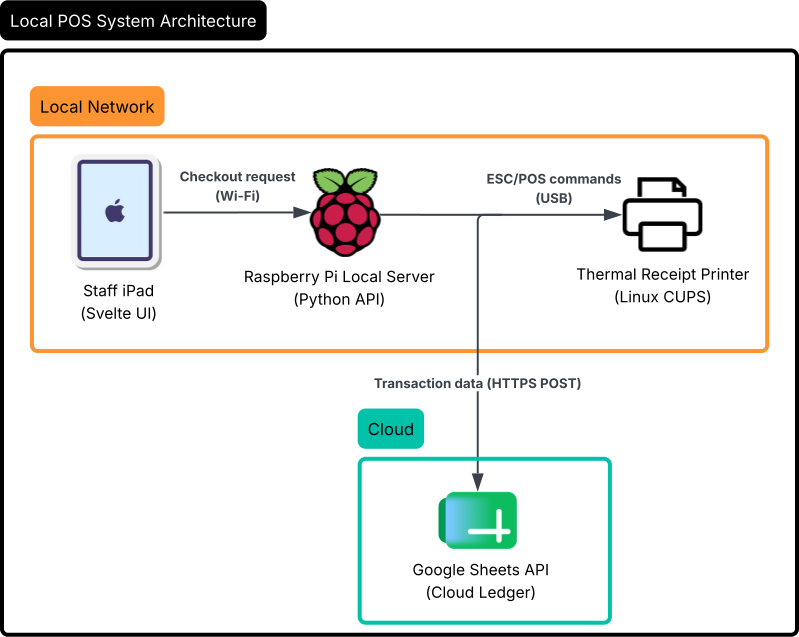
Visualizing the network path: Staff iPad → Raspberry Pi (Svelte/Python) → Concurrent outputs to USB Receipt Printer (CUPS/ESC-POS) and Cloud Google Sheets API ledger.
Technical Hurdles
After extensive research, I sourced the Star Micronics TSP800II printer. Because the store operated purely on iPads, I couldn't rely on traditional desktop printer utilities. My solution was to wire the TSP800II directly to a Raspberry Pi acting as a local server node.
Balancing a heavy raster printing task via CUPS alongside direct ESC/POS terminal string parsing required meticulous endpoint construction and device stream handling within FastAPI. This ensured that API calls from the iPad processed smoothly over the local Wi-Fi, never hanging or dropping data mid-transaction.
Impact & Results
100% Digital
Completely eliminated physical handwriting of receipt duplicates for staff records.
High Reliability
Drastically improved readability and legal reliability of business ledger histories.
Optimized Flow
Streamlined checkout workflows, saving active floor hours and catching data-entry mismatches.